How to build an AI email automation workflow
A practical walkthrough: pull the right contacts, draft each email with AI, and keep a human on the send. Built with n8n, Claude, and Resend.
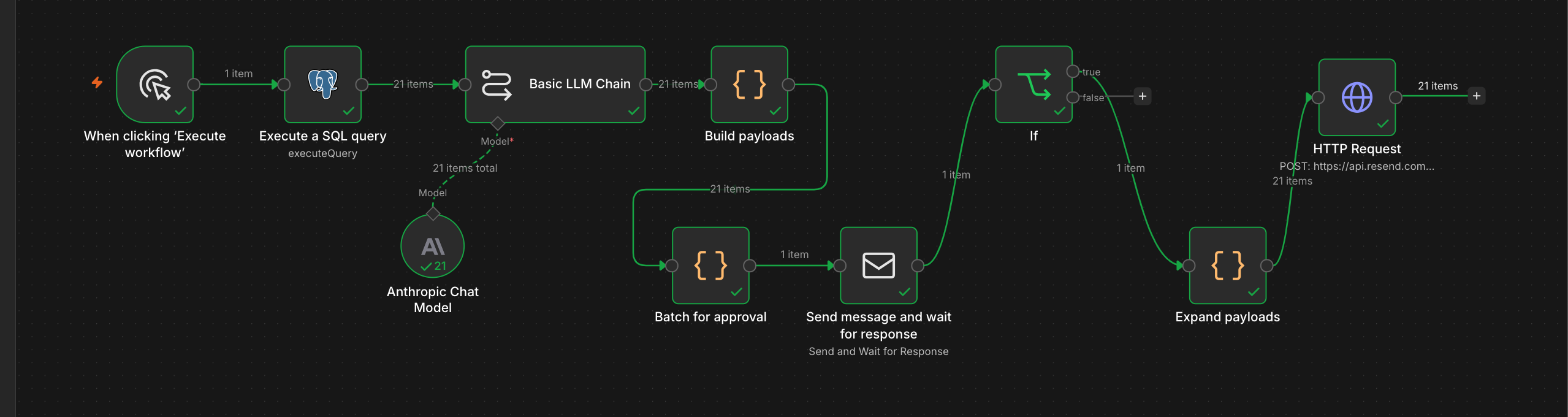
I built an AI email automation workflow to follow up with people who signed up for my product and then went quiet. It finds the right contacts, writes a personal email for each one with AI, and sends them after I approve. This is how to build one, step by step, and where the common patterns like RAG and human-in-the-loop fit in. I built mine for PsTally, and the full story is in the case study.
Decide what to automate
Before any wiring, decide what the AI should touch and what it should not. AI is good at drafting from data, classifying, and summarising. Keep a human in the loop for anything that cannot be undone, like sending a message to a real customer. Hand over the labour. Keep the judgement.
Pull the right contacts
Start with a query, not a list of everyone. This first step is retrieval, the R in RAG (retrieval-augmented generation). The idea is to fetch the right context first and generate from it, so the model works from facts instead of guessing. My retrieval is a database query: owners who signed up, added a console, then went quiet for a week. That is structured retrieval, because the data is relational and exact. If you were searching unstructured documents by meaning, you would use semantic retrieval with embeddings and a vector store instead. Either way, pull each person's real details in the same step, because that data is what makes the email personal later.
Draft each email with AI
Feed each contact's retrieved data to the model. I use Claude. Because it writes from real details, the output is grounded, meaning it is tied to facts and not hallucinated. The rest is prompt engineering: clear rules for length, whether to include a greeting or sign-off, and how to handle missing or placeholder data so it never addresses someone as a blank field. Use a cheap, fast model, because the task is simple and the cost should match the work.
Keep a human on the send
This is human-in-the-loop, and it is the step most people skip. Do not let the workflow send on its own. Have it show you every draft and wait for your approval before anything goes out. An email cannot be unsent, and your name is on it. The model does the labour; you make the decision. It is also the honest answer to where a person should always stay in control of an AI system.
Send and log
On approval, send through an email API. I use Resend. Batch the sends to stay under the rate limit, and include a working unsubscribe link. Then log what went out. Without logging you are guessing; with it you can measure replies and results, which is evaluation, knowing whether the workflow actually works.
Build it as a workflow, not an agent
Build this as a workflow (fixed steps you control), not an agent (where the model decides its own steps and which tools to call). The task is the same every run, so you want it predictable and cheap. An agent earns its cost when the path changes each time and the model needs to choose, reaching for tools through function calling or a standard like MCP. This does not, so I kept it a workflow.
That is the whole thing. Retrieval, a grounded draft, a human on the send, and an API to deliver. If you want to see it running on a real product, I wrote up how I use it for PsTally in the case study.
Leave a response